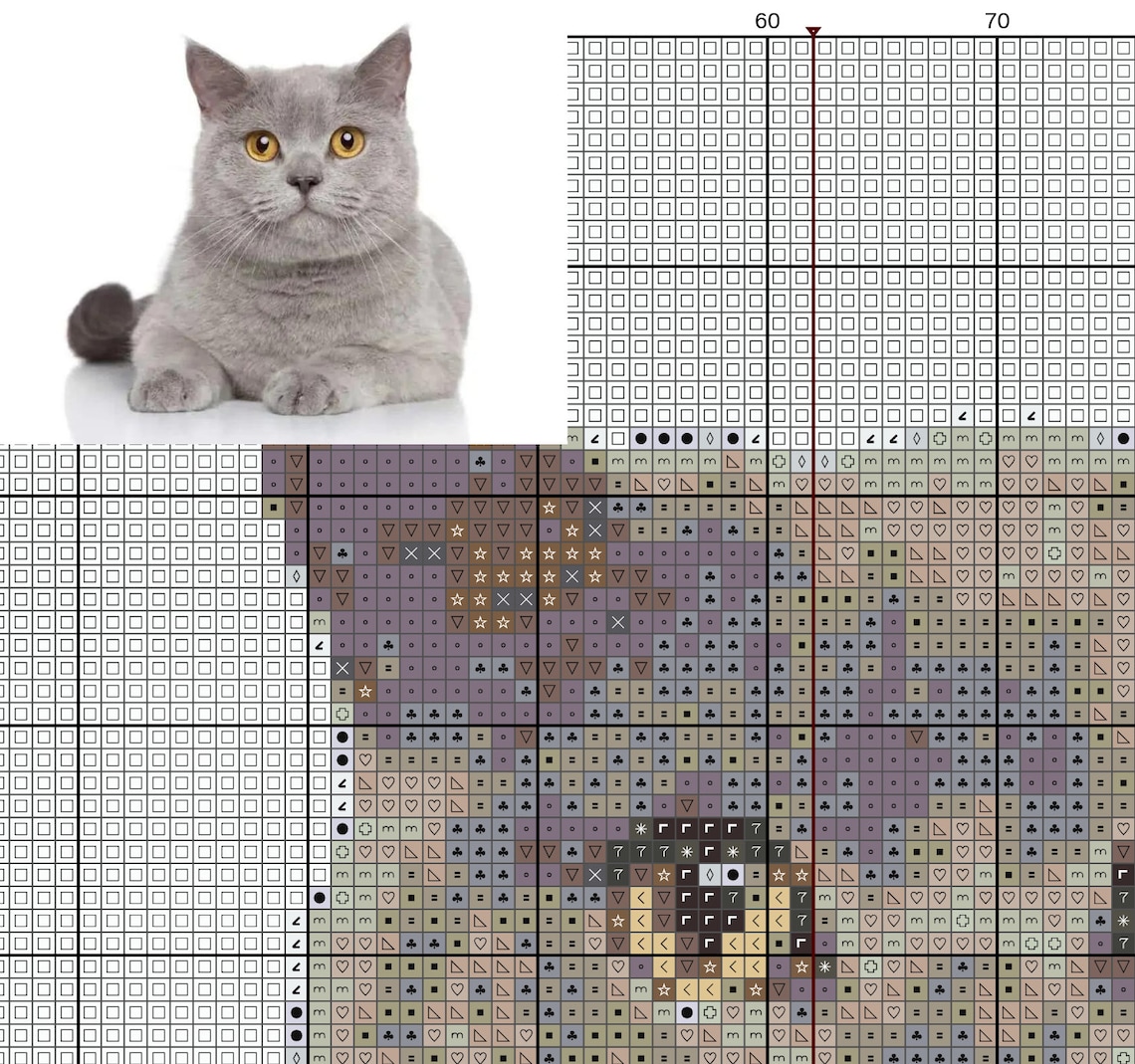
Imagine transforming a cherished photograph or a striking piece of artwork into a tapestry of tiny, colorful squares. The art of counted thread embroidery offers a unique pathway to breathe new life into beloved images, translating complex visuals into a richly textured, hand-stitched creation. The process allows one to capture the essence of a moment, a landscape, or even an abstract concept, rendering it in a timeless medium that exudes warmth and personal connection.
Throughout history, needlework has held a significant place in various cultures, serving as both a practical skill and a creative outlet. From the intricate samplers of the 17th century to the bold, graphic designs of the modern era, embroidery has consistently reflected the artistic sensibilities and societal values of its time. The creation of pictorial needlework provides a tangible link to this rich heritage, allowing artisans to connect with the past while simultaneously expressing their individuality.
The accessibility of this craft is part of its enduring appeal. Whether one is a seasoned needleworker or a complete beginner, the fundamental techniques are readily learned, and the required tools are relatively simple and inexpensive. This allows anyone to embark on a journey of creative exploration, gradually developing skills and mastering more complex designs. The structured nature of counted thread work, with its reliance on a gridded pattern, offers a satisfying blend of precision and artistic freedom, making it an ideal pursuit for those seeking a calming and rewarding hobby.
The world of counted thread embroidery is constantly evolving, with contemporary artists pushing the boundaries of traditional techniques and embracing new materials and color palettes. From minimalist geometric patterns to highly detailed, photo-realistic portraits, the possibilities are virtually limitless. Popular trends include incorporating metallic threads for added shimmer, experimenting with variegated floss to create subtle shading effects, and blending different stitch types to achieve unique textures and visual effects.
Ready to embark on your own counted thread embroidery adventure? The following will explore the possibilities available to you that can ease the translation of photographs and other images into cross stitch patterns, transforming your vision into needlework form.
Accuracy
Within the realm of digital to needlework translation, accuracy stands as a cornerstone. When an image journeys from a screen to a cross-stitch pattern, its essence the subtle gradations of color, the sharpness of lines, and the overall fidelity to the original hinges on the converter’s ability to maintain precision. An image to cross stitch pattern converter that prioritizes accuracy ensures that the final stitched piece mirrors the source material as closely as possible. This is paramount, because an inaccurate conversion can result in a distorted or lackluster representation of a beloved photograph or artwork, diminishing the intended impact and artistic merit. Think of a landscape scene, where the subtle shading in the hills or the vibrant hues of a sunset are crucial. An accurate converter will capture these nuances, rendering them as a harmonious blend of floss colors. Conversely, an inaccurate converter may lead to flattened tones and a loss of detail, ultimately detracting from the beauty of the finished piece.
The practical implications of accuracy extend beyond mere aesthetics. For those undertaking intricate projects, such as portraits or complex designs, precise color mapping is essential to avoid unintended color clashes or a muddied final product. High-quality converters often employ advanced algorithms and customizable color palettes to optimize the translation process. These tools can analyze the image, identify dominant colors, and suggest appropriate floss shades, while also allowing users to manually adjust and fine-tune the pattern to achieve the desired level of realism or artistic interpretation. Furthermore, the accuracy in pattern generation translates to fewer errors during the stitching process, minimizing frustration and ensuring a more enjoyable crafting experience. A well-converted pattern provides clear, legible instructions, allowing the stitcher to focus on the creative flow rather than grappling with ambiguities.
Ultimately, the pursuit of accuracy in image to cross stitch pattern conversion is an investment in quality and artistic integrity. While no conversion can perfectly replicate the infinite variations of color and texture found in a digital image, striving for the highest possible degree of precision is what separates a satisfactory result from a truly exceptional one. The challenges lie in balancing computational efficiency with artistic sensitivity, and in providing users with the tools and controls necessary to achieve their creative vision. As technology evolves, image to cross stitch pattern converters continue to refine their algorithms and enhance their user interfaces, paving the way for even more realistic and captivating needlework creations.
Customization
In the realm of counted thread artistry, customization stands as a vital gateway to personal expression. The capacity to fine-tune and adapt a digital image as it transforms into a cross-stitch pattern empowers the artisan to inject their unique vision and style into the creation. This freedom to personalize elevates the craft beyond mere replication, transforming it into a vehicle for self-discovery and artistic innovation.
-
Pattern Size Adjustment
The ability to adjust the dimensions of a cross-stitch pattern is fundamental to customization. A smaller pattern might be ideal for a delicate ornament or a card, while a larger pattern can accommodate a more elaborate wall hanging or pillow. Image to cross stitch pattern converter tools that offer this control allow the user to tailor the project to their specific needs and preferences, ensuring the final piece fits seamlessly into its intended space. A detailed landscape scene, for example, might benefit from a larger stitch count to capture finer details, while a simpler graphic design might work well with a smaller, more manageable pattern size.
-
Color Palette Selection
Beyond size, the choice of color palette significantly impacts the overall aesthetic of a cross-stitch project. Customization tools offer the freedom to select from a wide range of floss colors, allowing the artisan to match existing home dcor, experiment with different color combinations, or even create a monochromatic masterpiece. Some converters allow for manual color replacement, enabling the user to substitute suggested floss colors with their preferred brands or shades. A photograph of a vintage quilt, for instance, could be transformed into a cross-stitch pattern using the original colors, or alternatively, adapted to a more modern palette to reflect contemporary tastes.
-
Stitch Type and Detail Level
The level of detail in a cross-stitch pattern can also be customized to suit the skill level and aesthetic preferences of the stitcher. A beginner might opt for a simplified pattern with larger stitches, while a more experienced artisan might prefer a complex design with intricate details and a wider range of stitch types. Customization tools often provide options to adjust the number of colors used in the pattern, which directly affects the level of detail. Reducing the number of colors can simplify the pattern and make it easier to stitch, while increasing the number of colors allows for more subtle shading and realistic details. A portrait, for example, could be rendered in varying levels of detail, from a stylized representation to a highly realistic likeness.
-
Background Treatment and Focal Points
Many image to cross stitch pattern converter tools provide options for customizing the background treatment of the pattern. This may involve removing the background entirely to focus on the main subject, simplifying the background to reduce the stitch count, or even adding a custom background design. Furthermore, some tools allow the user to enhance focal points within the image, such as highlighting specific details or adding contrast to draw the eye to key areas. A photograph of a flower, for example, could have its background removed to create a clean and modern look, or its petals could be enhanced to emphasize their delicate texture and vibrant colors. The possibilities for personalizing the final piece are limitless.
Through these diverse facets of customization, an image to cross stitch pattern converter empowers individuals to transform ordinary images into extraordinary works of art. The ability to fine-tune pattern size, color palette, detail level, and background treatment unlocks a world of creative possibilities, allowing the artisan to imbue each project with their unique vision and style. These converters become a personalized experience to counted thread embroidery.
Accessibility
The intersection of accessibility and image to cross stitch pattern converter tools democratizes the art of counted thread embroidery. A user-friendly design fosters inclusivity, enabling individuals of varying technical skills and physical abilities to engage with this craft. This is because accessibility minimizes barriers, opening the door for more people to express their creativity through needlework. The cause and effect relationship is clear: heightened accessibility leads to a broader audience embracing the craft, thus enriching the creative landscape. The converter’s user-friendliness acts as an on-ramp, inviting newcomers and seasoned crafters alike to translate their visions into stitched reality. Examples such as intuitive interfaces, compatibility with screen readers for visually impaired users, and adjustable font sizes for individuals with visual challenges demonstrate a commitment to inclusivity.
The importance of accessibility as a core component of image to cross stitch pattern converter tools extends beyond mere convenience; it ensures equitable access to creative expression. Imagine a grandmother with limited technological proficiency wishing to transform a beloved family photo into a cross-stitch heirloom. An accessible converter, with its clear instructions and simplified controls, empowers her to achieve this goal, preserving memories in a tangible and deeply personal way. Similarly, an artist with mobility impairments might rely on voice-activated commands to navigate the software, designing intricate patterns from the comfort of their home. The practical significance of this understanding lies in recognizing that accessibility is not an afterthought but a fundamental design consideration, directly impacting the user’s ability to participate in and enjoy the craft.
In conclusion, accessibility serves as a cornerstone of the bridge connecting digital imagery and the art of cross-stitch. By prioritizing user-friendly design, compatibility with assistive technologies, and clear instructions, image to cross stitch pattern converter tools can break down barriers, empowering a wider range of individuals to express their creativity through needlework. While challenges may arise in ensuring universal accessibility across diverse platforms and user needs, the ongoing commitment to inclusivity enriches the craft, making it a more vibrant and welcoming space for all. The journey towards seamless accessibility is an ongoing process, the rewards of which resonate in the countless stories of individuals who find joy and fulfillment in transforming their digital visions into tangible works of stitched art.
What You’ll Need for Your “Image to Cross Stitch Pattern Converter” Project
Getting started with converting images to cross stitch patterns is easier than you might think! Here’s a breakdown of what you’ll need to get ready:
- An Image to Convert: This could be a photograph, a piece of digital art, or even a scanned drawing. The clearer the image, the better the resulting pattern.
- Image to Cross Stitch Pattern Converter Software or Website: There are many options available, both free and paid. Look for one that suits your skill level and offers the features you need (customization, color palette adjustments, etc.). Popular examples include Stitch Fiddle, Pic2Pat, and various mobile apps.
- Aida Cloth: This is the fabric specifically designed for cross stitch. It has a grid-like weave that makes it easy to create even stitches. The count of the Aida cloth (e.g., 14-count, 16-count) refers to the number of stitches per inch. A lower count means larger stitches and a bigger finished project.
- Embroidery Floss (Thread): Choose a high-quality embroidery floss in the colors specified by your converted pattern. DMC and Anchor are well-known and widely available brands. Your pattern should provide a color key with DMC or Anchor color codes.
- Embroidery Needle: Use a blunt-tipped embroidery needle (also known as a tapestry needle) with a large eye to easily thread the embroidery floss. The size of the needle should correspond to the count of your Aida cloth.
- Embroidery Hoop or Frame (Optional): An embroidery hoop or frame helps to keep your Aida cloth taut while you stitch, making it easier to create even stitches. Hoops come in various sizes and materials (wood, plastic).
- Scissors: A small pair of sharp scissors is essential for cutting the floss.
- Good Lighting: Proper lighting is crucial for seeing the Aida cloth grid and your stitches clearly, reducing eye strain.
- Pattern: Print the pattern or view it on a tablet or computer, so it’s easy to follow as you stitch.
- Optional Tools: Thread organizer, needle threader, seam ripper (for fixing mistakes).
Preparation Tips
Preparing Your Aida Cloth: Before you start stitching, it’s a good idea to bind the edges of your Aida cloth with masking tape or a zigzag stitch on your sewing machine. This will prevent the edges from fraying. You can also wash and iron the fabric to remove any creases. For larger pieces, consider using a frame to keep the fabric taut throughout the stitching process.
Organizing Your Threads: To avoid tangled threads and make it easier to find the colors you need, consider using a thread organizer. This could be a plastic box with compartments, a cardboard floss organizer, or even simple binder clips labeled with the DMC or Anchor color codes.
Lighting and Posture: Stitching can be time-consuming, so it’s important to create a comfortable workspace. Ensure you have good lighting to reduce eye strain. Maintain good posture while stitching to prevent back and neck pain. Take regular breaks to stretch and rest your eyes.
Choosing Your Image: Simple images with clearly defined lines and fewer colors generally translate well to cross stitch patterns, especially for beginners. Complex photographs may require more advanced converters and a larger stitch count to capture the details accurately.
Step-by-Step Instructions
Step 1
Select an image that you’d love to see transformed into a cross-stitch pattern. For beginners, simpler images with fewer colors and clearly defined lines work best. Think of a cartoon character, a simple flower, or a basic geometric design. Ensure the image is of good quality and properly lit for the best results in the pattern generation phase.
Step 2
Explore the many free and subscription options available. Consider what level of customization is important. Upload the image to your selected converter. Most platforms offer a straightforward upload process. Follow the instructions, usually involving clicking an “Upload” or “Choose File” button and selecting your image from your device.
Step 3
Once your image is uploaded, the converter will typically provide several settings to adjust the pattern. Here’s what you might encounter:
- Pattern Size: Choose the desired size of the finished cross-stitch. This will affect the overall stitch count. A smaller size is quicker to stitch, while a larger size allows for more detail.
- Fabric Count: Select the Aida cloth count you plan to use (e.g., 14-count, 16-count). The converter uses this information to generate the pattern correctly.
- Number of Colors: Adjust the number of colors used in the pattern. Reducing the number of colors simplifies the pattern, making it easier to stitch. A higher number of colors allows for more subtle shading.
- Color Palette: Some converters let you choose a specific color palette (e.g., DMC, Anchor). This ensures that the pattern uses colors that are readily available in your local craft store.
Experiment with the settings until you are happy with the preview of the pattern.
Step 4
Once you’ve adjusted the settings to your liking, generate the cross stitch pattern. Download the finished pattern in a PDF or similar format. Most converters will present the pattern as a grid with color symbols. The pattern should also include a color key, listing the DMC or Anchor color codes corresponding to each symbol.
Step 5
Gather all the necessary materials: Aida cloth, embroidery floss (in the colors specified by the pattern’s color key), embroidery needle, scissors, and an embroidery hoop (optional). Cut a piece of Aida cloth that is larger than the finished pattern size, allowing extra fabric around the edges for finishing. It is also recommended to bind the edges of your Aida cloth with masking tape or a zigzag stitch on your sewing machine to avoid fraying.
Step 6
Thread your needle with the first color of floss specified in the pattern. Following the pattern as your guide, begin stitching the corresponding color in the designated areas on your Aida cloth. Each square on the pattern corresponds to one cross stitch on the fabric. Each cross stitch is made up of two diagonal stitches. Most stitchers start from the top left of the pattern and work their way down and across, but there’s no ‘right’ way to stitch so go what works best for you. Remember to maintain consistent tension on your floss to create neat and even stitches.
Step 7
When you reach an area that requires a different color, finish stitching with the current color, secure the thread end on the back of your work by weaving it under previous stitches, and cut the thread close to the fabric. Then, thread your needle with the next color specified in the pattern, and continue stitching. Keep referring to your color pattern key to ensure you are stitching the right colors in the right places.
Step 8
Once you’ve completed the entire pattern, secure all the thread ends on the back of your work. You can weave the ends under previous stitches or use a small knot. Remove the embroidery hoop (if used), and gently wash your finished cross stitch with mild soap and water. Pat dry with a clean towel, and iron on the reverse side to remove any wrinkles. Now you can frame your finished artwork, turn it into a pillow, or use it as a decorative element in other craft projects.
So, there you have it! Transforming your favorite images into cross stitch patterns is a truly rewarding experience. It combines the precision of digital technology with the timeless charm of handcrafting, allowing you to create personalized works of art that you can cherish for years to come. The process itself is relaxing, meditative, and surprisingly fun.
The best part of this is how unique you can make each piece. It’s not just about recreating an image; it’s about infusing it with your personal touch and creativity. Each stitch tells a story, and each completed project is a testament to your patience and skill. Plus, they make heartfelt, personalized gifts that family and friends will adore!
We hope you’re feeling inspired to give it a try! Don’t be afraid to experiment with different images, settings, and techniques to find what works best for you. If you do, please share your creations with us we’d love to see what you come up with! Feel free to leave a comment below with your questions, tips, or project ideas.
Happy stitching!
Images References :
Image used for illustration purposes only. All rights belong to their respective owners.


